How to Track Body Measurements and Muscle Balance (New in the GymMonster App)
2026-07-03 · 3 min read
Strength numbers only tell half the story. You can add 20 kg to your squat while your bodyweight, waist and thighs quietly move in directions you're not watching. That's why the new GymMonster mobile app ships with two features built for the other half: body measurements and a muscle heatmap.
Here's how to use both properly — and why they beat the bathroom scale and the gym mirror.
Why the scale isn't enough
Bodyweight is one number summarizing muscle, fat, water and yesterday's dinner. It swings 1–2 kg day to day for reasons that have nothing to do with progress. The tape measure is slower to fool:
- Waist going down while weight stays flat? You're recomposing — losing fat while gaining muscle.
- Arms and thighs growing while waist holds? That "stall" on the scale is a win.
- Everything shrinking on a bulk? Something's off with your food, not your program.
How to take measurements that actually mean something
Measurements are only comparable if you take them the same way every time:
- Same time of day — first thing in the morning is easiest to standardize.
- Same state — before food and training, not after a pump.
- Same spots — biggest point of the arm, narrowest point of the waist, mid-thigh. Pick a rule and keep it.
- Every 2–4 weeks — muscle growth is slow; weekly measuring just adds noise.
In GymMonster, log weight plus neck, shoulders, chest, waist, hips, biceps, forearms, thighs and calves — each one gets charted over time, right next to your training history.
Track this free in GymMonster — on iOS, Android, or right inside Telegram.


The muscle heatmap: your training, visualized
The second new feature answers a question most lifters can't: "what did I actually train this month?" Not what the plan says — what you actually did.
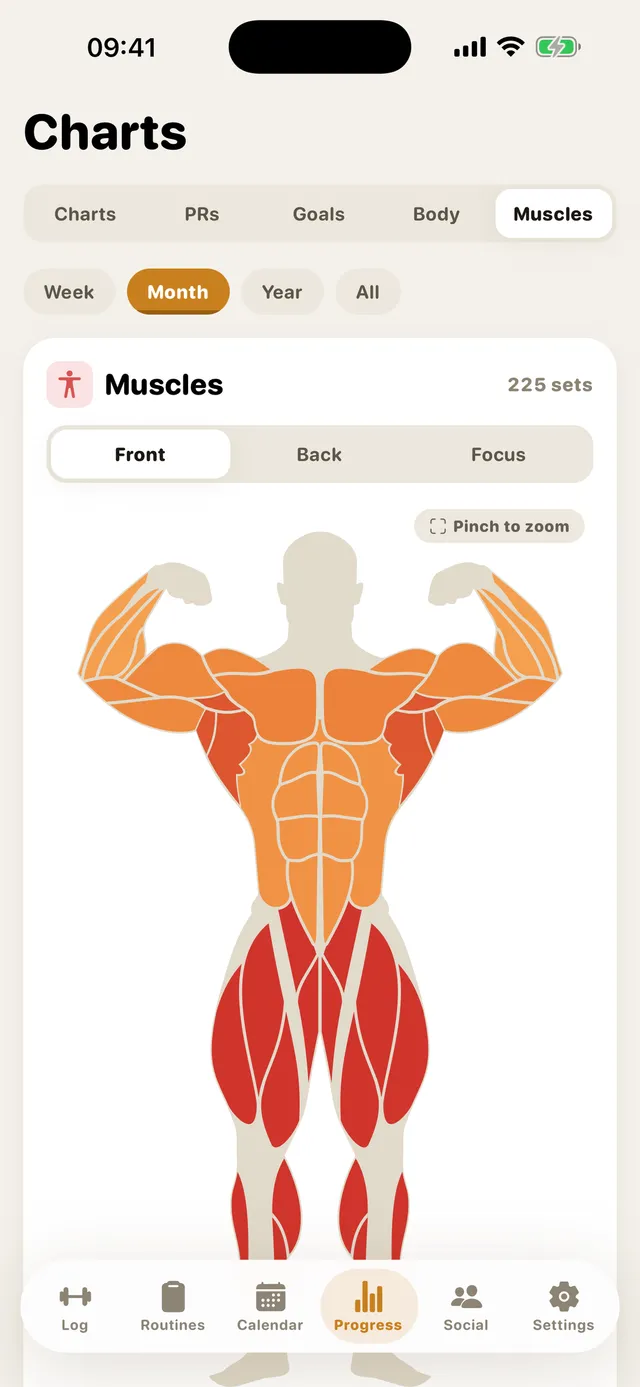
The heatmap takes your logged sets and lights up a body map, front and back, for the week, month or year. Well-trained muscles glow; neglected ones stay grey.
What it catches:
- The classic mirror-muscle drift — chest and arms lit up, hamstrings and back fading out.
- Accidental undertraining — you feel like you hit legs regularly, but two skipped sessions a month adds up.
- Volume imbalances — paired with set-per-week targets, you can see whether each muscle is getting enough work to grow.
A balanced heatmap over months is one of the best predictors that your progressive overload is happening everywhere, not just on your favorite lifts.
A simple monthly routine
- Log every workout as usual — the heatmap builds itself from your sets.
- Take measurements on the 1st of the month, same conditions each time.
- Check the heatmap: any muscle grey for a whole month gets priority next month.
- Check the measurement charts: trends over 8–12 weeks are the signal; single readings are noise.
Both features are in the GymMonster mobile app for iOS and Android — download links are on the homepage — and in the Telegram Mini App's progress section. If you're still deciding between the two, here's the full comparison.
Frequently asked questions
How often should I take body measurements?
Every 2–4 weeks is ideal. Muscle growth is slow, so measuring more often mostly captures water and food fluctuations rather than real change.
What body parts can I track in GymMonster?
Weight plus neck, shoulders, chest, waist, hips, biceps, forearms, thighs and calves — each charted over time in the mobile app.
How does the muscle heatmap work?
It maps every set you log to the muscles it trains and colors a front/back body map for the selected period, so you can instantly see trained and neglected muscle groups.
Are body measurements available in the Telegram version?
Yes. Body measurements and the muscle heatmap are available both in the mobile app for iOS and Android and in the Telegram Mini App's progress section — the native app just gives them more screen room.
Start tracking your workouts free
GymMonster is free on iOS and Android — or open it right inside Telegram, no download needed. Log your first set in under a minute.